2026/07/05
AI STL Generator — Create Printable STL Files from Images & Text
Use Magic3D as your AI STL maker. Generate STL files from photos or prompts, export for 3D printing, and convert GLB to STL free. STL creator guide for 2026.
AI STL Generator: Create Printable STL Files with AI
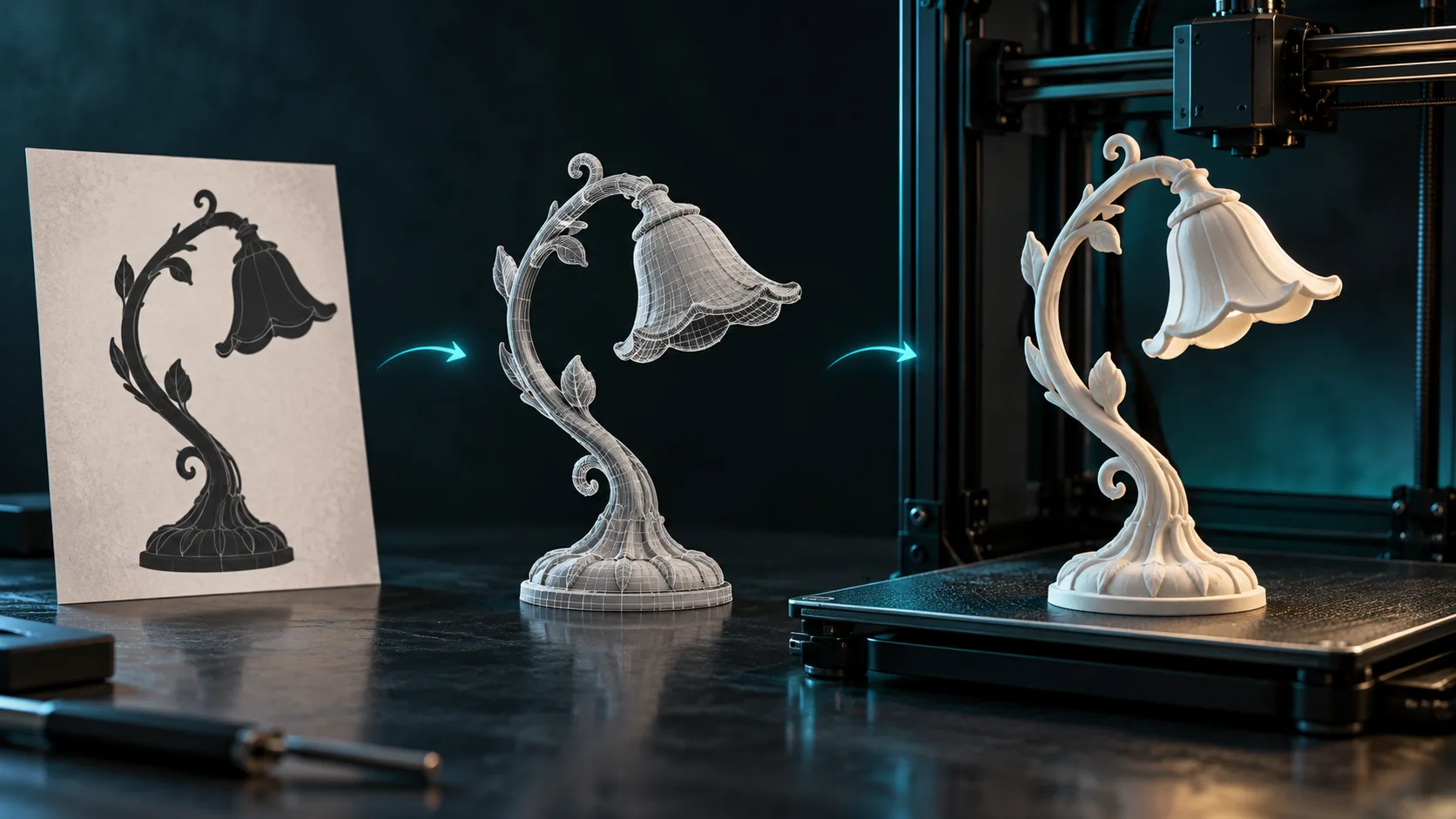
STL creator and STL file maker searches are rising as makers skip manual CAD for AI-generated meshes. Whether you start from a product photo or a text prompt, Magic3D on magic3d.io can produce AI-generated STLs ready for your slicer.
This guide covers the full image to STL AI workflow, free alternatives, and tips for successful prints.
What Is an AI STL Generator?
An AI STL generator (or free STL maker) uses machine learning to build 3D geometry, then exports .stl files — the standard format for Cura, PrusaSlicer, Bambu Studio, and most FDM/SLA printers.
Magic3D supports:
- Image → STL — upload a picture, export mesh
- Text → STL — describe an object, get a printable model
- GLB → STL — convert existing AI models with our free converter
Image to STL AI Workflow
Step 1: Generate from a photo
- Open AI STL Generator or Image to 3D
- Upload a clear product or object photo
- Wait 20–60 seconds for mesh generation
- Preview in the 3D viewer
Credits: 30 (mesh) or 40 (with PBR textures)
Step 2: Export STL
- Download STL directly from Magic3D (paid plans), or
- Export GLB and convert to STL via /3d-converter — free for everyone
Step 3: Slice and print
Import STL into your slicer, add supports if needed, and print. Treat AI meshes like any new model: check wall thickness, overhangs, and scale before committing filament.
Text to STL — No Photo Required
Don't have a reference image? Use Text to 3D:
- Describe the object: "small desk organizer with three compartments, rounded corners"
- Generate and preview
- Export STL or GLB → STL
Great for custom gifts, tabletop mini bases, and rapid prototyping.
STL Creator vs STL File Maker
Search engines treat stl creator, stl file maker, generate stl file, and ai to create stl files as the same intent. Magic3D covers all variants in one studio:
| Keyword cluster | Magic3D feature |
|---|---|
| stl creator | Direct STL export + converter |
| ai generated stls | Image/text AI mesh generation |
| image to stl ai | Picture to 3D pipeline |
| free stl maker | 50 free credits + free GLB→STL converter |
| ai 3d print | Full image → STL → slicer workflow |
AI for 3D Printing — Best Practices
| Tip | Why |
|---|---|
| Start with simple shapes | Fewer mesh artifacts |
| Scale in slicer | Verify dimensions before print |
| Add supports manually | AI may not optimize overhangs |
| Hollow large models | Save filament and time |
| Test at 50% scale | Cheap validation print |
For functional parts with tight tolerances, plan a CAD cleanup pass in Blender — AI excels at concept and decorative prints.
FAQ
Can AI create STL files from a picture?
Yes. Upload a photo, generate a 3D model, export STL. Review mesh quality in your slicer's preview.
Is there a free STL maker?
Magic3D gives 50 free credits at sign-up. The GLB to STL converter is free without credits. STL downloads from generated models require a paid plan.
GLB vs STL — which should I use?
GLB for web, AR, and previews. STL for 3D printing. Convert between them on Magic3D at no extra tool cost.
How does Magic3D compare to dedicated slicers?
Magic3D creates the model; your slicer (Cura, etc.) handles layers, infill, and supports. They complement each other.
Start Generating STLs
- Create a free account — 50 credits
- Try the AI STL Generator
- Export STL or convert GLB → STL
Related:
AI STL Generator: Create Printable STL Files with AIWhat Is an AI STL Generator?Image to STL AI WorkflowStep 1: Generate from a photoStep 2: Export STLStep 3: Slice and printText to STL — No Photo RequiredSTL Creator vs STL File MakerAI for 3D Printing — Best PracticesFAQCan AI create STL files from a picture?Is there a free STL maker?GLB vs STL — which should I use?How does Magic3D compare to dedicated slicers?Start Generating STLs
Thêm bài viết
ToolsTutorials
Trình tạo phông chữ 3D: Biến kiểu chữ thành chữ có chiều
Sử dụng trình tạo phông chữ 3D để khám phá kiểu chữ nhiều chiều cho logo, tiêu đề, nhãn sản phẩm và cảnh. Tìm hiểu cấu trúc lời nhắc, lựa chọn phông chữ và cân nhắc khi xuất.

ToolsTutorials
Trình tạo Logo 3D: Khám phá các khái niệm Logo theo chiều mà không làm mất quyền kiểm soát thương hiệu
Sử dụng trình tạo logo 3D cho đồ họa chiến dịch, cảnh sản phẩm và khái niệm tiêu đề. Tìm hiểu cấu trúc gợi ý, tài liệu dễ đọc và thời điểm quay lại logo vector ban đầu.
ToolsTutorials
Tạo tác phẩm điêu khắc 3D từ ảnh: Quy trình chuyển đổi hình ảnh thành 3D thực tế
Biến một bức ảnh thành một ý tưởng điêu khắc 3D với những hình ảnh tham khảo tốt hơn, những kỳ vọng thực tế và những bước kiểm tra cần thiết đối với các hình vẽ, tượng bán thân và vật kỷ niệm có thể in được.
Bản tin
Tham gia cộng đồng
Đăng ký nhận bản tin của chúng tôi để biết tin tức và cập nhật mới nhất