2026/07/05
How to Create a 3D Model from a Picture — Step-by-Step Guide (2026)
Learn how to create a 3D model from a picture with AI. Picture to 3D workflow, photo tips, GLB/STL export, and 3D printing prep. Free 50 credits on Magic3D.
How to Create a 3D Model from a Picture
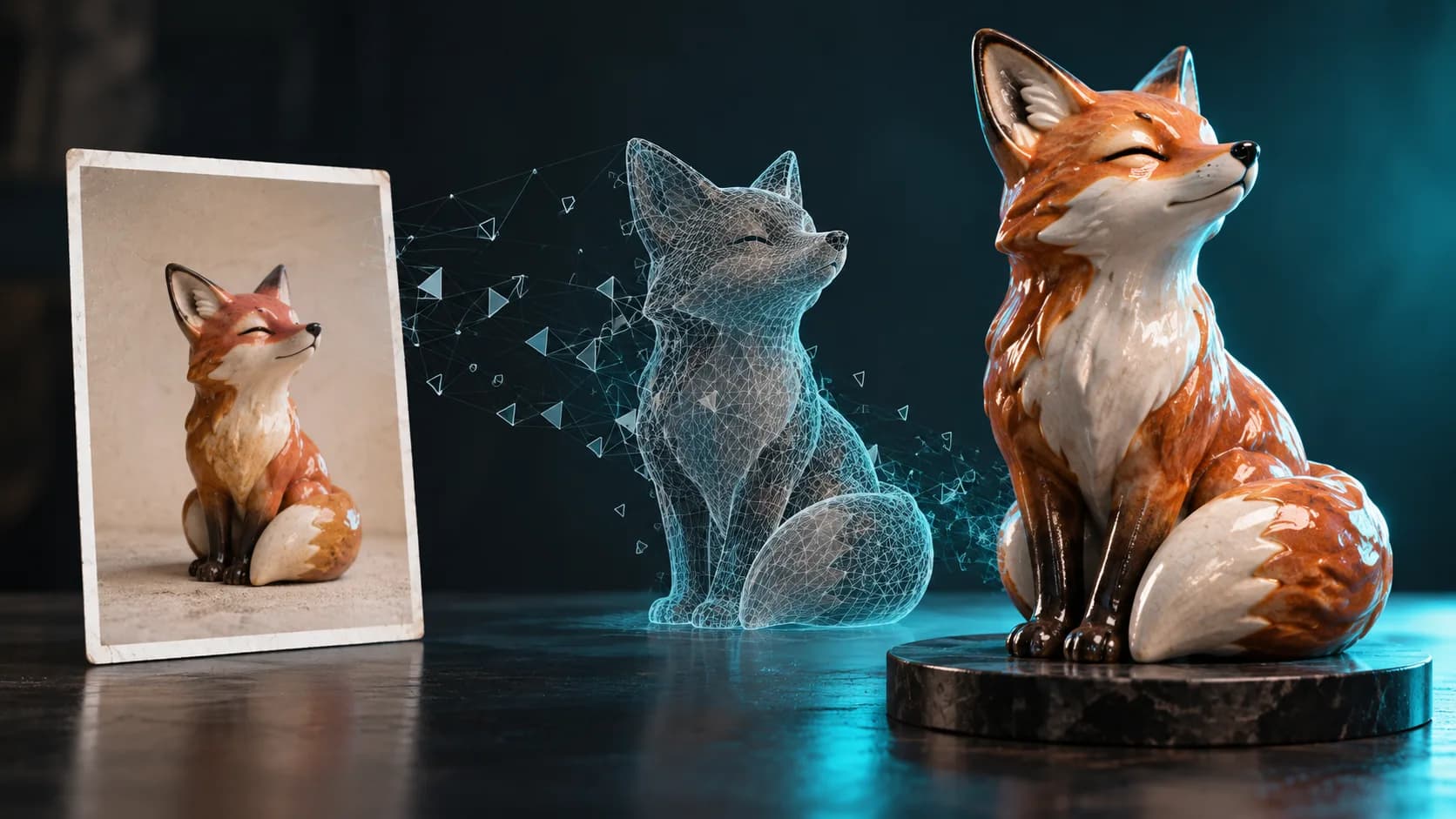
Create a 3D model from a picture is one of the fastest-growing AI workflows in 2026 — search interest for picture to 3D and photo to 3D jumped as e-commerce, game dev, and makers adopt browser-based tools. You no longer need Blender expertise or a 3D scanner: upload a photo, preview a mesh, export GLB or STL.
This guide walks through the full picture-to-3D pipeline on Magic3D, with tips that apply to any image to 3D converter.
What Is Picture to 3D?
Picture to 3D (also called photo to 3D, 2D to 3D, or make picture 3D) means turning a flat image into a three-dimensional mesh. AI estimates depth, silhouette, and surface detail from a single reference — then you rotate, refine, and export.
| Term | Meaning |
|---|---|
| Picture to 3D | Convert a photo/picture into a 3D model |
| Photo to 3D | Same workflow, emphasizes camera photos |
| 2D to 3D | Broader: any flat image → 3D geometry |
| Image to STL | Export path for 3D printing |
Step 1: Choose the Right Source Picture
Best results when you convert photo into 3D model follow these rules:
| ✅ Do | ❌ Avoid |
|---|---|
| Single centered subject | Multiple overlapping objects |
| Plain or soft background | Busy scenes |
| Even lighting, minimal shadows | Strong backlight / silhouettes |
| 1024px+ resolution | Heavy JPEG compression |
| Sharp edges visible | Motion blur |
Product photos and character reference sheets work especially well. Lifestyle shots with clutter are harder for AI to parse.
Step 2: Upload to Magic3D
- Open Picture to 3D or Image to 3D Converter
- Select Image to 3D mode in the generator
- Upload JPG, PNG, or WebP (max 10MB)
- Optional: enable PBR textures (+10 credits) for realistic materials
Credit cost: 30 credits (mesh) or 40 credits (with textures). New accounts get 50 free credits on magic3d.io.
Step 3: Preview and Refine
- Rotate the model in the built-in viewer
- Check proportions against your source picture
- Re-generate with a cleaner photo if geometry looks off
- For characters, try a front or three-quarter view
Step 4: Export Your 3D Model
| Format | Best for |
|---|---|
| GLB | Web viewers, AR, Shopify 3D |
| STL | FDM/SLA 3D printing |
| OBJ | Blender, Maya, general editing |
| FBX | Unity, Unreal Engine |
Need STL only? See our AI STL Generator guide or convert GLB → STL with the free 3D converter.
How to Make 3D Models from Pictures — FAQ
Can one picture create a full 3D model?
Yes — single-image picture to 3D works for many objects. Symmetric products and simple props get the best results. Complex organic shapes may need multiple reference angles.
How is this different from Meta Image to 3D?
Magic3D is a full AI 3D modeler studio: text-to-3D, image-to-3D, AI images, and video in one workspace. You get GLB/STL/OBJ/FBX export, PBR textures, and commercial licensing on paid plans — a practical alternative when you need production assets.
Can I make a 3D human model from a photo?
Yes. Upload a portrait or full-body reference with clear lighting. For game avatars or figurines, use a neutral pose and plain background. Read more in our AI 3D modeler guide.
Is picture to 3D free?
Magic3D offers 50 free credits at sign-up. Generation and preview are free; downloads unlock on paid plans.
Picture to 3D vs Manual Modeling
| Approach | Time | Skill | Best for |
|---|---|---|---|
| AI picture to 3D | 1–2 min | None | Prototypes, concepts, print tests |
| Blender photogrammetry | Hours | High | Archival accuracy |
| CAD from scratch | Days | Expert | Engineering tolerances |
For most creators, AI 2D to 3D bridges the gap between inspiration and a printable or game-ready asset.
Start Creating from Pictures
Ready to make a 3D model from a picture?
- Sign up free on Magic3D — 50 credits
- Open Picture to 3D
- Upload your image and export GLB or STL
Related guides:
How to Create a 3D Model from a PictureWhat Is Picture to 3D?Step 1: Choose the Right Source PictureStep 2: Upload to Magic3DStep 3: Preview and RefineStep 4: Export Your 3D ModelHow to Make 3D Models from Pictures — FAQCan one picture create a full 3D model?How is this different from Meta Image to 3D?Can I make a 3D human model from a photo?Is picture to 3D free?Picture to 3D vs Manual ModelingStart Creating from Pictures
Postingan Lainnya
ToolsTutorials
Generator Font 3D: Ubah Tipografi menjadi Huruf Dimensi
Gunakan generator font 3D untuk menjelajahi tipografi dimensi untuk logo, judul, label produk, dan pemandangan. Pelajari struktur cepat, pemilihan font, dan pertimbangan ekspor.
ToolsTutorials
Generator Logo 3D: Jelajahi Konsep Logo Dimensi Tanpa Kehilangan Kontrol Merek
Gunakan generator logo 3D untuk grafik kampanye, adegan produk, dan konsep judul. Pelajari struktur cepat, materi yang dapat dibaca, dan kapan harus kembali ke logo vektor asli.
ToolsTutorials
Membuat Patung 3D dari Foto: Alur Kerja Praktis Gambar-ke-3D
Ubah foto menjadi konsep patung 3D dengan gambar referensi yang lebih baik, ekspektasi realistis, dan pemeriksaan penting untuk gambar, patung, dan kenang-kenangan yang dapat dicetak.
Buletin
Bergabunglah dengan komunitas
Berlangganan buletin kami untuk berita dan pembaruan terkini